Elevate Nursery Design with Laser-Cut Banners
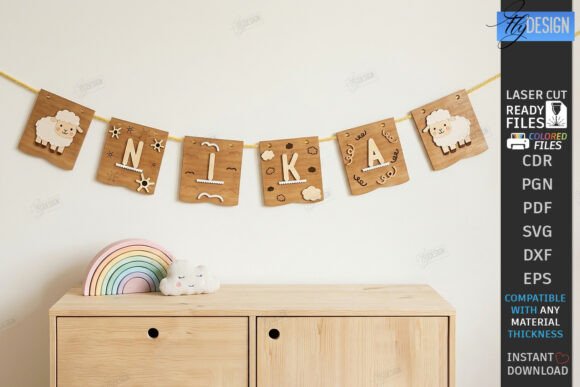
In the realm of modern interior styling and personalized graphic design, few elements combine craftsmanship with visual impact as effectively as a Baby Name Banner Laser Cut Wall Decor. This unique fusion of typography and physical art transforms a simple name into a focal point, bridging the gap between digital precision and tangible warmth. For designers and creators, understanding how to leverage these assets is key to delivering high-quality, custom experiences that resonate emotionally with clients.
The Intersection of Typography and Physical Space
Typography is not merely about selecting fonts; it is about creating a visual hierarchy that guides the eye and communicates identity. When applied to nursery environments, personalized name garlands serve as both decoration and brand identity for the child’s personal space. The clean lines and geometric precision achievable through laser cutting allow for a modern aesthetic that complements various design trends, from boho minimalism to safari-themed adventures.
From a professional graphic design perspective, the value lies in the versatility of the source files. A well-structured vector file ensures that the design scales perfectly, maintaining integrity whether it is cut from thin plywood for a delicate garland or thicker acrylic for a bold statement piece. This scalability is crucial for maintaining professional presentation across different material applications.
Optimizing Workflow for Laser Cutting Machines
Creating flawless physical products starts with robust digital preparation. Designers must ensure their creative assets are optimized for specific manufacturing tools. For instance, when preparing files for Glowforge or other CNC machines, distinct color coding is essential for instructing the machine on how to process the material. Typically, red lines indicate cut paths, while black lines denote engraving areas. This clear visual distinction streamlines the production process and minimizes errors.
However, software compatibility plays a significant role in the final output. Many designers prefer using Lightburn for its advanced features, but it is important to note that SVG file formats can sometimes distort dimensions during import. To mitigate this, utilizing the DXF file format is often recommended for better results in Lightburn. Ensuring that your cutting machine and software are compatible with the provided file types—such as SVG, EPS, PNG, PDF, and DXF—is a critical step in a smooth design workflow.
Key Considerations for File Selection
- SVG: Ideal for most web-based design tools and standard laser software, offering scalable vector graphics.
- DXF: Preferred for Lightburn users to prevent dimension distortion and ensure precise cutting paths.
- PNG: Useful for previewing designs or for digital mockups in social media graphics and marketing materials.
- EPS & PDF: Great for editorial design layouts and professional print presentations where vector quality is paramount.
Enhancing Brand Identity and Customer Experience
Beyond the nursery, the principles used in creating these personalized items apply broadly to branding and packaging design. The attention to detail in kerning, spacing, and letterform consistency reflects a commitment to quality that strengthens brand identity. When customers receive a product that exhibits perfect alignment and clean edges, it enhances their perception of the brand’s professionalism.
Moreover, these digital products offer immense value for creative projects beyond physical goods. Designers can use the included PNG and SVG files for digital marketing campaigns, creating engaging social media graphics that showcase customization options. This approach not only aids in visual design consistency across platforms but also improves user engagement by allowing potential clients to visualize the end result before purchase.
Practical Tips for Designers and Makers
To maximize the potential of these laser-ready files, consider the following best practices:
- Verify Dimensions: Always double-check measurements in your specific software, especially if switching between SVG and DXF formats.
- Material Testing: Different materials react differently to laser engraving and cutting. Test settings on scrap pieces to achieve the desired depth and finish.
- Color Palette Coordination: While the cut itself is monochromatic, consider how the wooden or acrylic texture interacts with surrounding wall colors and nursery themes.
- Client Communication: If a client requires a specific file type or custom size, maintain open lines of communication. Offering flexibility, such as providing alternative PNG sizes or different file formats, enhances customer satisfaction.
Ultimately, the success of any design project relies on the seamless integration of aesthetic appeal and technical precision. By leveraging high-quality, laser-ready templates, designers and makers can create stunning, personalized decor that stands out in a crowded market. Whether for a child’s room or a broader creative endeavor, thoughtful design choices elevate the final product, ensuring it is not just seen, but felt. Thank you for visiting my shop, and be sure to follow for future releases that continue to blend artistic vision with practical utility.