3D Layered Mandala Cut File Guide
Creating intricate paper art has never been more accessible than it is today, thanks to the rise of digital cutting machines and high-quality design files. At the heart of this creative revolution is the 3D Layered Mandala – Multilayer Cut File, a digital asset that transforms flat sheets of cardstock into stunning, dimensional wall art. Whether you are a seasoned crafter looking to expand your portfolio or a beginner eager to try something new, understanding how these files work can unlock a world of artistic possibility.
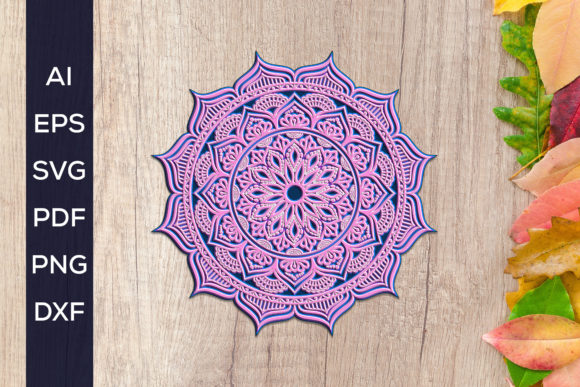
A mandala is traditionally a geometric configuration of symbols, often representing spiritual guidance or the universe. In the context of modern crafting, a 3D layered mandala takes this circular symmetry and adds depth. Instead of a single flat image, the design is split into multiple distinct layers. When these layers are cut from different colored papers and stacked with foam adhesive or spacers, they create a shadow-box effect that draws the eye inward. The 3d Layered Mandala SVG – Multilayer Cut File included in this digital download provides the precise vector paths needed to achieve this look without requiring advanced graphic design skills.
Why Choose Multilayer Designs?
The primary appeal of a multilayer cut file lies in its ability to produce professional-grade results with minimal manual effort. Hand-cutting complex mandala patterns is not only time-consuming but also prone to human error. A single slip of the knife can ruin hours of work. By using a digital file compatible with cutting machines like Cricut or Silhouette, you ensure that every curve and line is perfect. This consistency is crucial when aligning multiple layers, as even a millimeter of deviation can disrupt the visual harmony of the final piece.
Beyond precision, these files offer immense versatility. The 3D Layered Mandala – Multilayer Cut File allows you to experiment with color theory in a tangible way. You might choose a monochromatic palette for a subtle, elegant look, or use contrasting colors to make each layer pop. This flexibility makes the design suitable for various interior styles, from bohemian chic to modern minimalist. For entrepreneurs and small business owners, this means you can create a unique product line where no two pieces need to look exactly alike, offering customization options that customers love.
Understanding the File Formats
One of the most valuable aspects of this digital download is the comprehensive range of file formats provided. Not all crafting software or machines accept the same file types, so having options ensures compatibility regardless of your setup. The file will be in a ZIP format and will need to be extracted before use, which is a standard practice for bundling multiple digital assets together. Once extracted, you will find:
- SVG files: Scalable Vector Graphics are the gold standard for web-based cutting software like Cricut Design Space. They maintain quality at any size.
- DXF files: Drawing Exchange Format files are ideal for users of Silhouette Studio Basic Edition, which does not support SVG imports without an upgrade.
- AI file: Adobe Illustrator files are perfect for professional designers who want to edit the vectors directly in industry-standard software.
- EPS file: Encapsulated PostScript files are widely supported by various vector editing programs, offering another layer of flexibility.
- PDF files: These are useful for printing references or viewing the layer order without specialized software.
- PNG files: With a transparent background at 300 dpi, these high-resolution images are great for sublimation projects, digital mockups, or clipart usage.
The files will be available for download immediately after purchase, allowing you to start your project right away. This instant access is particularly beneficial for last-minute gift ideas or urgent client orders.
Practical Applications and Use Cases
The utility of a 3D Layered Mandala – Multilayer Cut File extends far beyond simple home decor. For educators, these designs can serve as excellent tools for teaching geometry, symmetry, and color theory. Students can engage in hands-on learning by assembling the layers, gaining an appreciation for mathematical patterns in art. For therapists and mindfulness coaches, the process of assembling layered mandalas can be a meditative activity, promoting focus and relaxation.
In a commercial context, freelancers and marketers can use the included PNG files for digital products. You might incorporate the mandala elements into wedding invitations, greeting cards, or branding materials. The high resolution ensures that the images remain crisp even when printed on larger formats. Small business owners selling handmade goods can use the SVG and DXF files to produce inventory for craft fairs, online marketplaces like Etsy, or local boutiques. The ability to scale the design means you can create everything from small coaster sets to large statement wall pieces.
Tips for Successful Assembly
To get the best results from your 3d Layered Mandala SVG – Multilayer Cut File, consider a few practical tips. First, always test cut a single layer on scrap paper to ensure your machine settings are correct. Different cardstocks have different thicknesses, so blade depth and pressure may need adjustment. Second, pay attention to the layer order. Most files come with a guide or numbered layers, but it is helpful to lay them out physically before gluing. This prevents mistakes that are difficult to undo once adhesive is applied.
Using foam tape between layers is key to achieving the 3D effect. Standard double-sided tape will flatten the design, losing the depth that makes these mandalas special. Experiment with different thicknesses of foam spacers to control the shadow intensity. Finally, consider lighting. These designs look best when displayed with directional lighting, such as a spotlight or natural window light, which accentuates the shadows and enhances the three-dimensional illusion.
Important Considerations Before You Start
While working with digital cut files is straightforward, there are important factors to keep in mind. Ensure you have the necessary software to open and manipulate the files. If you are a beginner, start with the SVG or DXF files depending on your machine. If you plan to edit the design, such as changing shapes or combining elements, you will need vector editing software like Adobe Illustrator or Inkscape to work with the AI or EPS files.
Additionally, respect the licensing terms associated with your download. Most digital creators allow personal and small commercial use, but it is essential to verify this before selling finished products. Understanding these boundaries helps support the creator community and ensures you stay compliant with intellectual property rights.
In conclusion, the 3D Layered Mandala – Multilayer Cut File is more than just a digital download; it is a gateway to creating sophisticated, professional-looking art. With its diverse file formats, immediate availability, and endless creative potential, it supports a wide range of goals from personal hobbyist projects to serious business ventures. By leveraging these tools, you can bring depth, beauty, and precision to your crafting endeavors.